Smart Info Management Services

Transform chaos into clarity.

  • Home
  • Declutter and Get Organized
    • Build Your Solution
    • Simply Start
    • Lose the Paper Weight
    • Increase Productivity
  • The Deletist Blog
  • Workshops
  • Subscribe Now
  • Contact
  • About Us

May 19, 2017

Moving: Bearing Witness

Moving: Bearing Witness

I believe that bearing witness is an important part of any purging process.  I’ve sat next to many people while helping them go through their things and make decisions, sometimes difficult ones, about what to keep and what to toss.

The challenge arises because we assign meaning and value to our “things” for any number of reasons, most of which are not based on logic and rationale, but rather from emotion or sentiment.  As a result, our “things” get intertwined with emotions and memories making it challenging to toss them when we need to make space, declutter, get ready to move, or move on.

I’ve come to understand the importance and appreciate the value of bearing witness to another’s purging process.  Or even to having my own purging witnessed.  Having another person there is important to validate the memories and emotions that we’ve attached to our things, some of which make it difficult to let go of the physical (or digital object), even though we can still retain the memory in our minds and bodies.

One afternoon a friend came over to help me pack.  That day I happened to be packing the contents of some shelves in my bedroom.  It was loaded with really personal things, some of which were from high school. I shared with my friend a journal from my teenage years containing a series of cartoons I had drawn with stick figures.  We laughed together over the drawings and captions.  My friend mentioned this was the real reason to have people over to help. It’s not just about the physical labor, but also about the emotional aspect of packing (or purging) that often needs a human witness.  Sometimes we need someone there to watch when we’re ready to purge as a way of moving on after a breakup or death.

Since I’m a regular purger, the whole process didn’t come with a lot of opportunities to reminisce and relive memories triggered by my things.  But then again, I only produced two bags of garbage and one medium-sized box of items to give away which made it more manageable in the frantic last few days before the movers came.

My kitchen cupboards, however, offered me some real opportunities to get creative with the contents resulting in some really odd dishes.  No reminiscing or witnesses necessary here! I think this would qualify as an exception to the rule.

Read more posts at The Deletist

Filed Under: Uncategorized Tagged With: slider

May 19, 2017

Moving. Ugh.

Moving. Ugh.

I moved in January.  I always find moving equal parts excitement and annoyance combined with a healthy amount of stress.  It’s not just the physical effort involved to relocate my things, moving also requires addresses to be updated, plus time spent going through everything.  I had already invested time and energy preparing my things in anticipation of moving, since I had desperately been wanting to move for months. In the weeks leading up to the move my ego was interested to see if the stress and annoyance would be reduced simply because I had already been preparing for months.  Plus, I aim to be a minimalist and I figured moving was the perfect time to put my methods to the test.

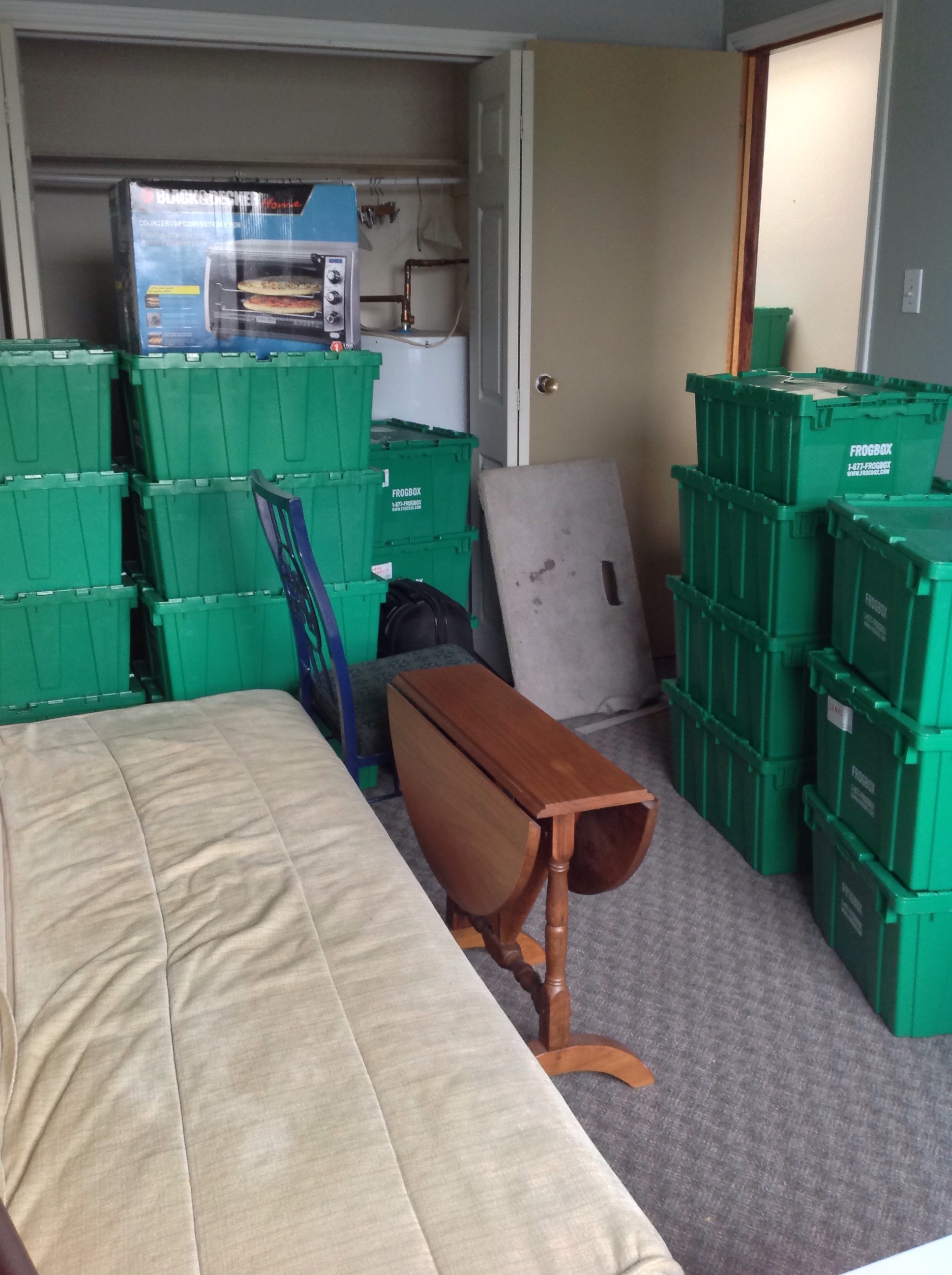
I rented reusable plastic tubs from a company named Frog Box.  They eliminated the time needed to assemble/disassemble cardboard boxes and waste.  I also hired movers for the steep 3-floor walkup.  My first hurdle was ordering the right number of tubs.  The orders came in three sizes: Minimalist, Regular, and Collector.  I wanted to order Minimalist and stand by my delusional beliefs about my habits, but I went with the Regular and added in two wardrobe boxes.  Time limit: Sat Jan 2 – Monday Jan 11, 9 days.

The 2-bedroom regular order: 35 large tubs, 5 small tubs, plus two additional wardrobe boxes.

The packing went fairly smoothly.  I packed for a few hours each day.  Fortunately my mother flew in to help me for the last couple days before the move.  I was one step away from throwing things into tubs.  The tubs piled up.  Everywhere!  Despite my best efforts to stay organized, it seemed like there was always one more thing that needed to be packed.

One lonely shelf discovered unpacked minutes before the movers arrived!

Throughout the process I kept wondering “do I have a lot of stuff?”  I felt self-conscious that I needed almost 40 tubs to hold all my possessions, plus all the furniture and other bulky items stored separately.  However, many of the tubs only had a few things in them (e.g. food processor or blankets) and were easy to unpack.

Tubs in Progress

We only had 3 days to empty all the tubs so we had to move fast, even though some things didn’t have a proper home.  I noted the order in which I emptied the tubs to see if it would be the inverse of how I had packed them.  It wasn’t.

The move was annoying, but overall it did feel less stressful and less time consuming than previous times.

Read more posts at The Deletist

Filed Under: Uncategorized

July 25, 2016

Amazon Dash Button

Amazon Dash Button

Early in 2015 Amazon released a new product/service called Amazon Dash, which allows people to order products directly from their homes.  Whenever a product, such as toilet paper or laundry detergent, is running low, the customer can order the product directly through Amazon by speaking, or scanning the item’s barcode, into a wand.  Once ordered, the customer confirms the order in his/her Amazon account.  Then the order arrives through the mail. I suppose one day we’ll be able to 3-D print it instead.

The Amazon Dash also comes as a button, instead of a wand.  Each button is for one specific product.  Amazon recommends putting the button next to product for re-ordering convenience.  For example, the bathroom would have buttons for toothpaste and toilet paper. Never run out of tp again!

I can definitely see the appeal of Amazon Dash.  By pushing a button, or waving a wand, my house could be turned into a grocery store.  Amazing, creepy, and weird, all at the same time.  I lived over 5 years in an apartment with a steep 3-floor walkup.  I grew accustomed to picking up a few things daily, just to avoid carrying heavy loads up the stairs.  Most of the time I didn’t mind.  It allowed me to try a wide variety of things from different shopping areas around the city.  I knew where to find the best of anything.  I enjoyed seeing what was available.

Would Amazon Dash be able to cater to such specific, specialized grocers?  Or would I be required to get all my specialty items from mega-suppliers?  I did wonder about this and a few other things.

  1. What if I want to switch brands?  Dash buttons are only for one product and come imprinted with the company logo.
  2. What about apartment dwellers?  My building doesn’t accept packages.  I have to retrieve packages from a busy post office with restricted hours, about 10-minutes away.  Pretty inconvenient.
  3. How would I keep track of all the orders coming in?  It can get confusing to keep track of so many orders, all arriving at different times.  If I get everything from the grocery store, everything arrives at the same time
  4. How would you control annoying guests, like myself, or children, from pushing the dash buttons?  It could become annoying to reject orders all the time.Amazon Dash, here to stay, or is this just the beginning…

Filed Under: Uncategorized

July 25, 2016

Technology Transitions

Technology Transitions

After my unanticipated dunk in the lake with my smartphone (available here), the rice did not work as well as I had originally thought.  Thankfully all the data was restored and accessible, but the camera never worked again.  Selecting the camera icon resulted in a black screen that consequently caused other weird things to happen. Also the battery only lasted about 5 hours, max.  Even when turned off, the battery was still draining itself.  I figured it was just a matter of time before something disastrous happened.

I know some people are constantly upgrading and switching their devices for the latest and greatest.  However, I like to set everything up and then use it for as long as possible (basically until the device breaks or becomes too outdated).

The smartphone is newer so it has a few different capabilities from the previous model and some of the settings behave differently.  Some of the integration options are different, or no longer available, resulting in lots of Google searches. I’m still figuring out what it can do and where everything “lives”.  For example, if I want the timer to sound an alarm, the ringer must be turned on for everything in the phone.  Since I use the timer when I meditate, I don’t want the phone tweeting and chirping for anything except the end of the timer.  I’m also a little bit sad the new model doesn’t come with the same default seagull-ocean ring tone.

The transition was not as smooth as I had anticipated despite the fact that my phone hardly contained any unique content.  For example, most of my pictures were available in other places and my contacts were all in gmail.  Naturally I was quite surprised when I logged in and the contacts didn’t just appear.

Even worse, the manager at the shop attempted to move all my contacts from one phone to the other through a bluetooth connection.  The end result was hundreds of contacts appearing, full of duplicates (many of which had to be adjusted manually) and all kinds of weird email addresses that I had used maybe once a long time ago.  I’m still figuring out which settings control this kind of thing.

Obviously I need to invest more time learning how to backup everything, including the apps, so I don’t have to reinstall everything if something else happens.

Read more on my Blog The Deletist


Filed Under: Uncategorized

July 25, 2016

Life Line

Life Line

Last week I blogged about my accidental time off from my smartphone.  Since I wasn’t distracted by it for two whole days, it gave me an opportunity to think about how many things I use it for such as messaging on three separate apps, checking email, taking & viewing pictures, using the calendar, storing contacts, navigating, researching, maintaining my to-do list, accessing information, jotting down notes/story ideas, and plain old phone calls.

Ironically enough, the most difficult challenge of being without my phone was for the least-used feature, making actual calls.  At some point during my two-day break I had a moment of panic about how I would contact somebody if there was an emergency.  I’m not sure the fire department is equipped to respond to tweets and 9-1-1 Skype calls.  I have an old-fashioned push-button phone plugged into the jack to access my building’s intercom system, but that’s all it’s connected too.

During our AGM the other week the Board mentioned they were looking into the option of having the intercom connected with a cell phone instead of the regular plug-in kind.  Many people cheered at this.  I would have been one of them before being phone-less for two days.  Even if we do get the cell phone hook up option, I’m still keeping my old-fashioned phone for backup, just in case.

This is one of the main problems we face when we rely on one device to do so many essential things.

When one part breaks, the whole organism fails.  Not very sturdy or reliable.  My smartphone does so many amazing things for me that I often forget at the core, it’s still a phone.  When it took the plunge last week, I only thought about the data losing sight of the most important, basic function, being able to call for help.

I wonder if this is what it will be like for “smart” homes that rely entirely on a hub to manage and control a household of things connected through the internet.  What if something happens to the hub (e.g. an accident, water damage, faulty wire, etc.) or the internet connection?  Will people be left with a house full of working items that can’t be used or controlled because the motherboard is down?  Will we lose sight and control of our most basic necessities because we’re so preoccupied with convenience and speed?

Filed Under: Uncategorized

  • 1
  • 2
  • Next Page »

CONTACT

Email:
lisa@smartinfomanagement.com

Call:
416.821.3563

RSS Recent Posts

SUBSCRIBE NOW

*For a limited time only, sign up now for a free chapter of The Art of Making Space!

Receive updates from...

Copyright © 2026 · Executive Pro Theme on Genesis Framework · WordPress · Log in